Swipe It
Swipe It is a Marci swipe deck for anything you need to decide on. Cards come from you or connected tools, in categories like to-dos, ideas, jobs, places or links. Swipe right to select, up to see it later with a reminder, and left to discard it for good.
Tap one and watch the phone

 Marci
Tap Swipe It on the phone, or ask me one of these.
Who it's for
People whose assistants send lots of options
Let Claude, ChatGPT or workflows deal cards in batches, then decide a dozen in a minute.
Anyone with growing lists
Turn a reading pile, a restaurant list or job alerts into a deck, and give each yes a clear next step.

Your work, your clients, your lists.
Every screen



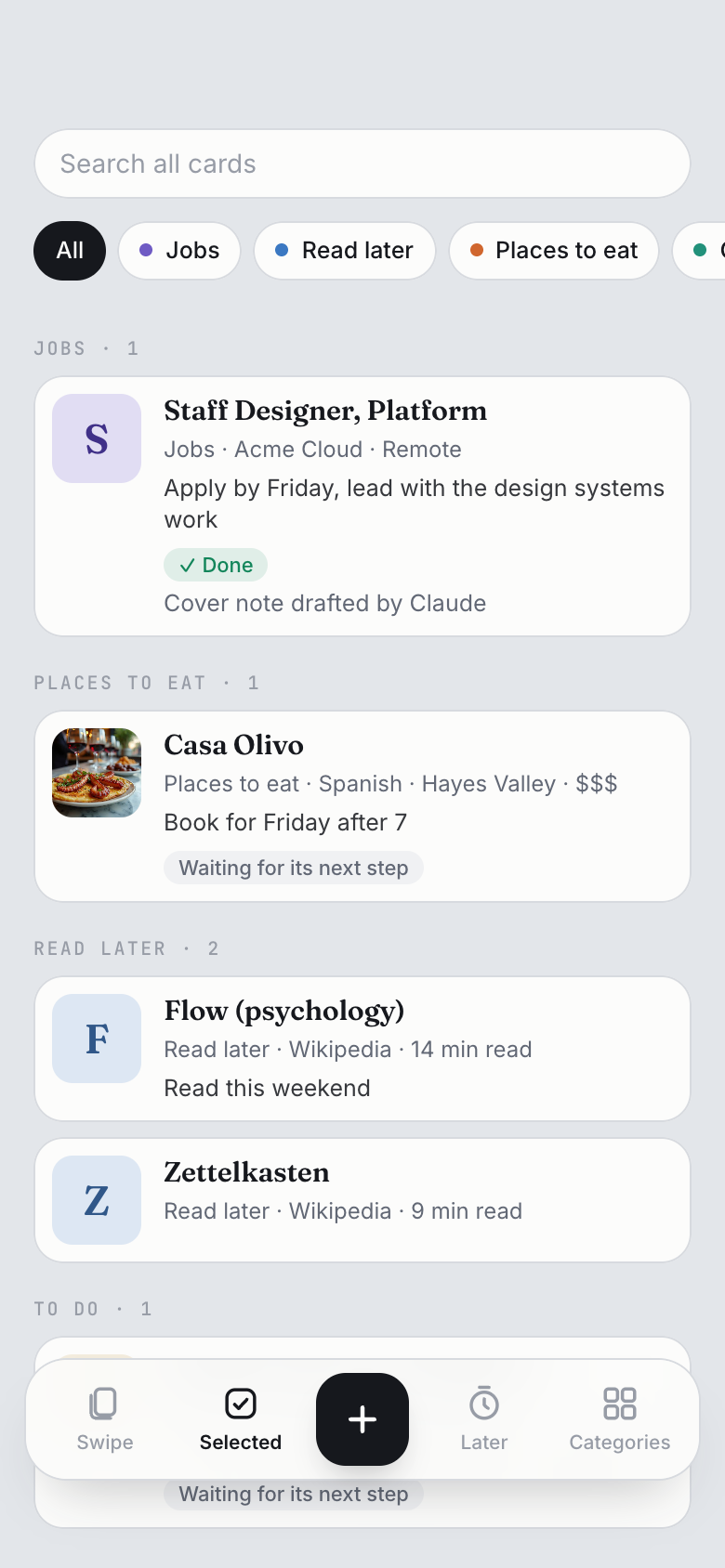
Ways to use it
Morning job alerts
Swipe through fresh job cards. Right to select with a note on what to do next, left to discard with a reason.
Not now
Swipe up and pick tonight, tomorrow, this weekend or next week. The card comes back to the top then, with a reminder carrying your note.
Tools that act
Connected tools read your selects and notes, act on them and report back what they did.
What it does
- Swipe a deck of cards: right to select, up to see it later, left to discard. A SELECT, LATER or DISCARD stamp shows the direction while you drag, and a short drag springs back
- The Swipe screen fits any phone or window without scrolling: what's left and Undo last swipe, the category chips, then the deck
- Pick one or more categories to swipe; each chip shows how many cards are left in it
- Cards without a picture are set in type on their category's colour with a big title, the details that matter and the link's site; cards with a picture lead with it
- Tap a card to open all of it: the full text, every detail, the link, why it's here, your note, and Discard, Later and Select buttons
- Swipe notes: after each swipe a short sheet asks what to do with it, when it should come back, or why not. On for a new install, switched off on the Categories screen
- Later cards leave the deck and come back to the top at the time you picked (tonight, tomorrow, this weekend, next week), with a reminder carrying your note
- Undo last swipe reverses your last swipe, note included
Make it yours
Ask for a change in your own words and Marci updates the app for you.
Add a Gifts category
Add 'in an hour' as a Later option
Turn swipe notes off for the Places category

A coach for Swipe It
Tap the Marci button inside Swipe It and say yes to a coach: a room of its own where Marci knows the app, checks in on the days you choose and answers questions about your numbers. Give a friend their own copy with a share link; they get the app, never your entries.
Pairs well with



Part of
Questions
Where do the cards come from?
You add them by voice, typing, a photo or a pasted link. Claude, ChatGPT, Marci chat, your room and workflows can add cards in batches to any category or a new one.
Do discarded cards come back?
No. A card you discard never comes back, and your reasons tell tools what to stop sending.
Can I undo a swipe?
Yes. Undo last swipe reverses your last swipe, note included.
How do I connect AI tools?
Marci can connect to ChatGPT, Claude and other AI tools, which read or update the apps you choose. See getmarci.ai/connectors.
Marci is rolling out now
Marci is invite only for now. Join the waitlist, or ask a friend on Marci for an invite.